
Email deliverability audit
Email audit: clear findings and a plan.
I'll analyse your sending and show you what to improve. You get a report and an action plan for your team.
 Wojtek BlazalekI personally lead your audit
Diagnosis
Evidence
Action plan
When the reports leave you guessing
You can see something is wrong, but your team needs to know where to focus. An audit helps investigate situations like these:
Gmail opens fall while other mailbox providers look stable.
Your platform reports messages as delivered, but recipients say they never arrived.
More messages are rejected, delayed or blocked by mailbox providers.
A migration or a new type of email has left it unclear who owns which part of the setup.
Messages fail sender identity checks, and your team needs to understand why.
Let's choose the right starting point:
- A block needs immediate attention: see Urgent help.
- Key reports are missing: we'll first agree how your team can collect the data.
- You also need guidance during implementation: explore 90-Day Care.
From symptoms to a plan
The audit takes about three weeks. I'll keep you informed about the findings, open questions and anything I need from your team. The timing depends on the data available.
Before we start
We discuss the problem and sign an NDA. You get a checklist of data to prepare.
Week 1: map the setup
I map your sending tools and domains, then collect reports and message samples.
Week 2: test the causes
I test possible causes and separate facts from hypotheses. You get a midway update.
Week 3: set priorities
You get a report and action plan. We agree priorities and how to check the changes.
Your team implements
Your team implements and checks the changes. Further guidance is optional.
The checks behind the diagnosis
I review the technical setup alongside your sending practices. The aim is to understand how the evidence fits together and where your team should focus.
Sending setup and authentication.
I map domains, subdomains, sending streams, platforms and IPs. I check SPF, DKIM, DMARC and domain alignment, along with DNS, rDNS, MX and the postmaster and abuse mailboxes.
Reputation and sending sources.
I review domain and IP reputation, relevant blocklists, Google Postmaster domain reputation and spam rate. DMARC reports help identify authorised and unexpected sources.
Rejections, complaints and delays.
I analyse hard and soft bounces, the original rejection messages, complaints and deferrals, comparing sending streams and mailbox providers.
How people join and leave.
I check consent records, signup confirmation, form abuse protection, suppression lists and how you handle inactive recipients. I also review unsubscribes, including one-click unsubscribe where required.
Messages and links.
I review sender identity, the separation of marketing and transactional emails, and changes in content or frequency. I also check tracking domains, redirects and the security of linked resources.
A report your team can act on
You get a one-page summary for decisions and a technical appendix for the people making changes. We review the findings together so your team can agree what to tackle first.
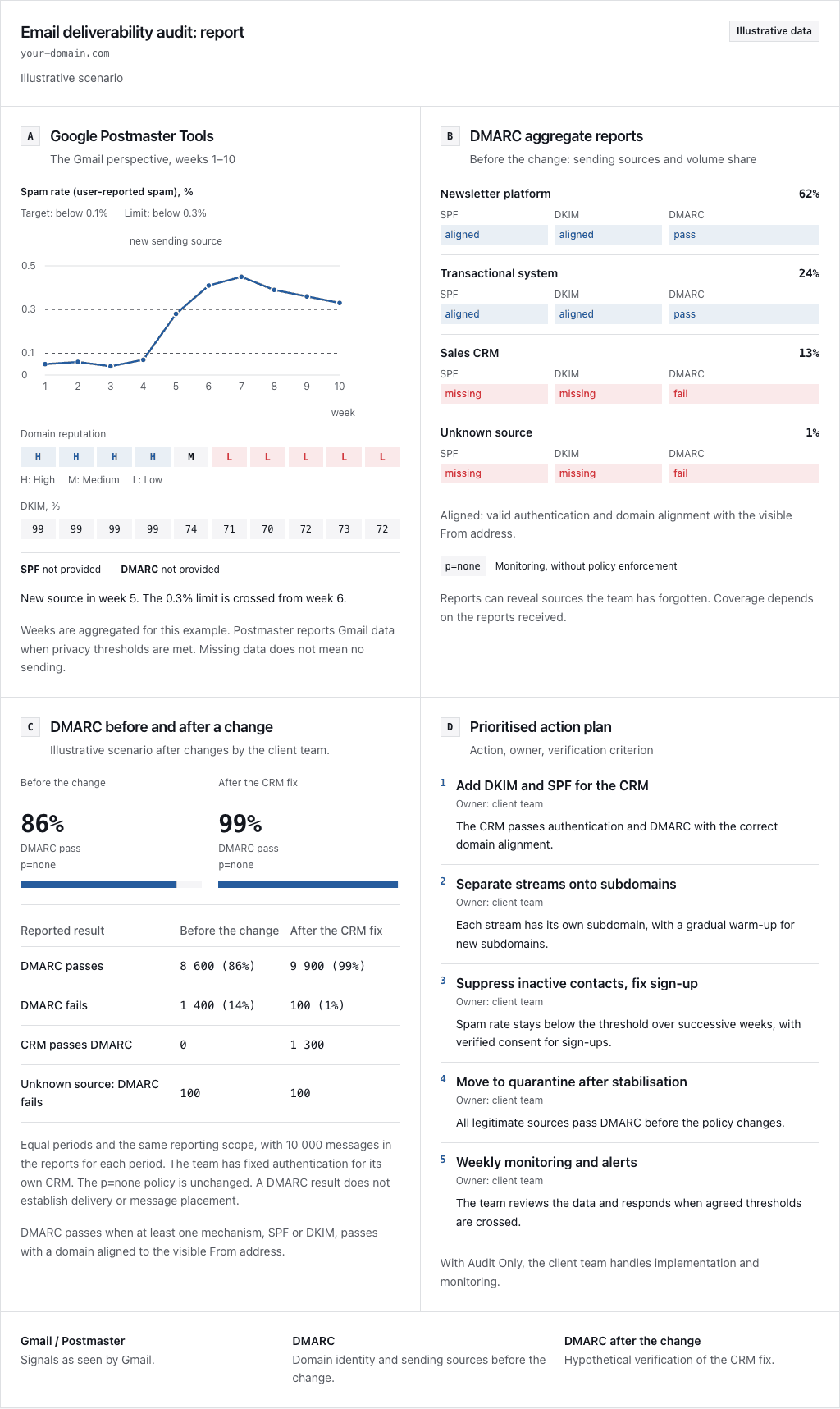
The example below uses fictional data to connect Gmail signals, sending sources and a before-and-after DMARC comparison. It compares equal reporting periods before and after a hypothetical CRM authentication fix by the client team. The policy stays at p=none, and the unknown source still fails DMARC. Passing DMARC does not show whether a message reached the inbox.
Email deliverability audit: report
your-domain.com
Illustrative scenario
Illustrative report showing declining Gmail signals and a CRM failing authentication checks. In a hypothetical comparison of equal reporting periods, the client team fixes CRM authentication and more messages pass DMARC. The policy remains p=none and the unknown source still fails DMARC. The action plan lists tasks, owners and verification criteria. These results do not measure inbox placement.
Google Postmaster Tools
The Gmail perspective, weeks 1–10
| week | Spam rate (user-reported spam), % | Domain reputation | DKIM % |
|---|---|---|---|
| 1 | 0.05 | High | 99 |
| 2 | 0.06 | High | 99 |
| 3 | 0.04 | High | 99 |
| 4 | 0.07 | High | 99 |
| 5 | 0.28 | Medium | 74 |
| 6 | 0.41 | Low | 71 |
| 7 | 0.45 | Low | 70 |
| 8 | 0.39 | Low | 72 |
| 9 | 0.36 | Low | 73 |
| 10 | 0.33 | Low | 72 |
Domain reputation
New source in week 5. The 0.3% limit is crossed from week 6.
Weeks are aggregated for this example. Postmaster reports Gmail data when privacy thresholds are met. Missing data does not mean no sending.
DMARC aggregate reports
Before the change: sending sources and volume share
- Newsletter platform62%
- SPF
- aligned
- DKIM
- aligned
- DMARC
- pass
- Transactional system24%
- SPF
- aligned
- DKIM
- aligned
- DMARC
- pass
- Sales CRM13%
- SPF
- missing
- DKIM
- missing
- DMARC
- fail
- Unknown source1%
- SPF
- missing
- DKIM
- missing
- DMARC
- fail
Aligned: valid authentication and domain alignment with the visible From address.
p=noneMonitoring, without policy enforcement
Reports can reveal sources the team has forgotten. Coverage depends on the reports received.
DMARC before and after a change
Illustrative scenario after changes by the client team.
Before the change
86%
DMARC pass
p=none
After the CRM fix
99%
DMARC pass
p=none
| Reported result | Before the change | After the CRM fix |
|---|---|---|
| DMARC passes | 8 600 (86%) | 9 900 (99%) |
| DMARC fails | 1 400 (14%) | 100 (1%) |
| CRM passes DMARC | 0 | 1 300 |
| Unknown source: DMARC fails | 100 | 100 |
Equal periods and the same reporting scope, with 10 000 messages in the reports for each period. The team has fixed authentication for its own CRM. The p=none policy is unchanged. A DMARC result does not establish delivery or message placement.
DMARC passes when at least one mechanism, SPF or DKIM, passes with a domain aligned to the visible From address.
Prioritised action plan
Action, owner, verification criterion
Add DKIM and SPF for the CRM
Owner: client team
The CRM passes authentication and DMARC with the correct domain alignment.
Separate streams onto subdomains
Owner: client team
Each stream has its own subdomain, with a gradual warm-up for new subdomains.
Suppress inactive contacts, fix sign-up
Owner: client team
Spam rate stays below the threshold over successive weeks, with verified consent for sign-ups.
Move to quarantine after stabilisation
Owner: client team
All legitimate sources pass DMARC before the policy changes.
Weekly monitoring and alerts
Owner: client team
The team reviews the data and responds when agreed thresholds are crossed.
With Audit Only, the client team handles implementation and monitoring.
Gmail / PostmasterSignals as seen by Gmail.
DMARCDomain identity and sending sources before the change.
DMARC after the changeHypothetical verification of the CRM fix.
A summary for decisions. Details for implementation.
Diagnosis.
What is happening, the likely causes and what the available evidence supports.
Evidence.
Each finding links to its data source. Facts, hypotheses and conflicting signals are clearly distinguished.
Action plan.
Tasks in order of expected impact, with an owner and a way to check each change.
Decisions and access.
What your team needs to decide or provide so the work can move forward.
Technical appendix.
The sending inventory, configuration records, source data, message analysis and detailed verification checks.
I record when the data was collected and any gaps that limit the diagnosis. Questions the evidence cannot answer remain open in the report.
What is your team seeing?
Tell me about the symptoms and what has changed. In a 30-minute call, we'll discuss whether an audit would help you decide what to do next.
I'll show you what to prepare
After we sign the NDA, I'll send instructions for gathering the materials. Your team supplies the data and makes any configuration changes needed to collect it.
Access to reports.
Read-only access to Google's sender reputation dashboard and your domain authentication reports, or the tools collecting them. If reporting is missing, I'll explain how your team can enable it.
The last 90 days of sending data.
Exports of sent and delivered messages, bounces with reasons, complaints, opens, clicks and unsubscribes. Where available, split them by type of email and mailbox provider.
Your domains and platforms.
A list of sending domains, subdomains and tools, including support, billing and sales systems. Include read-only access to domain settings or exported records.
Original message samples.
A sample from each type of email, with full technical headers. My instructions explain how to save these using “Show original” or the equivalent option.
People to work with.
A contact who knows your sending activity and can make decisions, plus the person responsible for implementing technical changes afterwards.

You'll work directly with me
I'm Wojtek Blazalek. I have 15+ years of experience in B2B SaaS. I was Head of Deliverability at GetResponse in 2021–2025 and previously worked at Woodpecker and Email Industries.
I participate in M3AAWG and spoke at Inbox Expo in 2022. I analyse your data and work through the findings with your team.
A clear scope and price
Audit Only: $2,400 net + VAT, one-time fee. The base price covers the diagnosis, report, action plan and review meeting.
We'll discuss your situation, whether an audit fits and what data we'd need to get started.
Engagement terms
- Payment is 50% at the start and 50% after the review meeting, with 14-day payment terms.
- We work from an agreed order.
- We sign an NDA before you share data.
- Your team implements technical and domain configuration changes and sets up monitoring after the audit.
- You pay for any tools and licences required.
90-Day Care starts with the audit, followed by guidance during implementation, verification against your data and monitoring setup.
90-Day Partner includes Care and adds weekly working meetings and support with escalations to mailbox providers. Both options require a minimum of three months. Continuing is optional, with no automatic renewal.
Choose the support your team needs
You have the report and plan. Choose how to implement them.
Your own team.
Use the action plan to implement technical and domain changes, set up monitoring and check progress against the agreed criteria.
90-Day Care.
The audit comes first, followed by implementation guidance, verification against your data and monitoring setup. Minimum three months.
- Compare support options
90-Day Partner.
Includes Care, with weekly working meetings and support for escalations to mailbox providers. Minimum three months.
Optional, after the project
Monitoring after the project.
Standard or Extended monitoring is available to track signals and investigate changes. Any continuation is optional, with no automatic renewal.
Before you decide
Will the audit get our emails into the inbox?
The audit gives you a diagnosis and a plan; it cannot guarantee inbox placement. Results also depend on implementation, sending practices, recipient behaviour and mailbox providers. A “delivered” status does not identify the folder, and opens alone are not proof of inbox placement. We agree how to check progress using the available data.
Do you need access to our sending platform?
Read-only access or sufficiently detailed exports can be enough. I'll send a checklist before we start. If you grant access, use an account invitation; I don't need your password.
What if we aren't collecting reports yet?
I'll explain how your team can enable reputation and authentication reporting before analysis begins. Your team makes the changes. We start collecting data without tightening the domain's protection policy. Reports arrive over the following days, and missing history may limit what we can establish.
Which types of email can you audit?
Opt-in marketing and expected transactional messages, such as account notifications and order confirmations. The review includes how recipients subscribe, what they expect and how they can leave marketing lists.
Will you change our domain settings?
Your team makes the domain and platform changes using the action plan. Audit Only covers the diagnosis, report, plan and review meeting. Care and Partner provide guidance during implementation and verification of changes against your data.
How is our information protected?
We sign an NDA before you share data, and it continues to apply after the engagement. We agree which audit materials I need access to. I only share details of your project publicly with your permission.
Let's talk about your emails
Tell me what changed and what your team is seeing. In a 30-minute call, we'll review the symptoms and available data, then discuss whether an audit is the right next step.