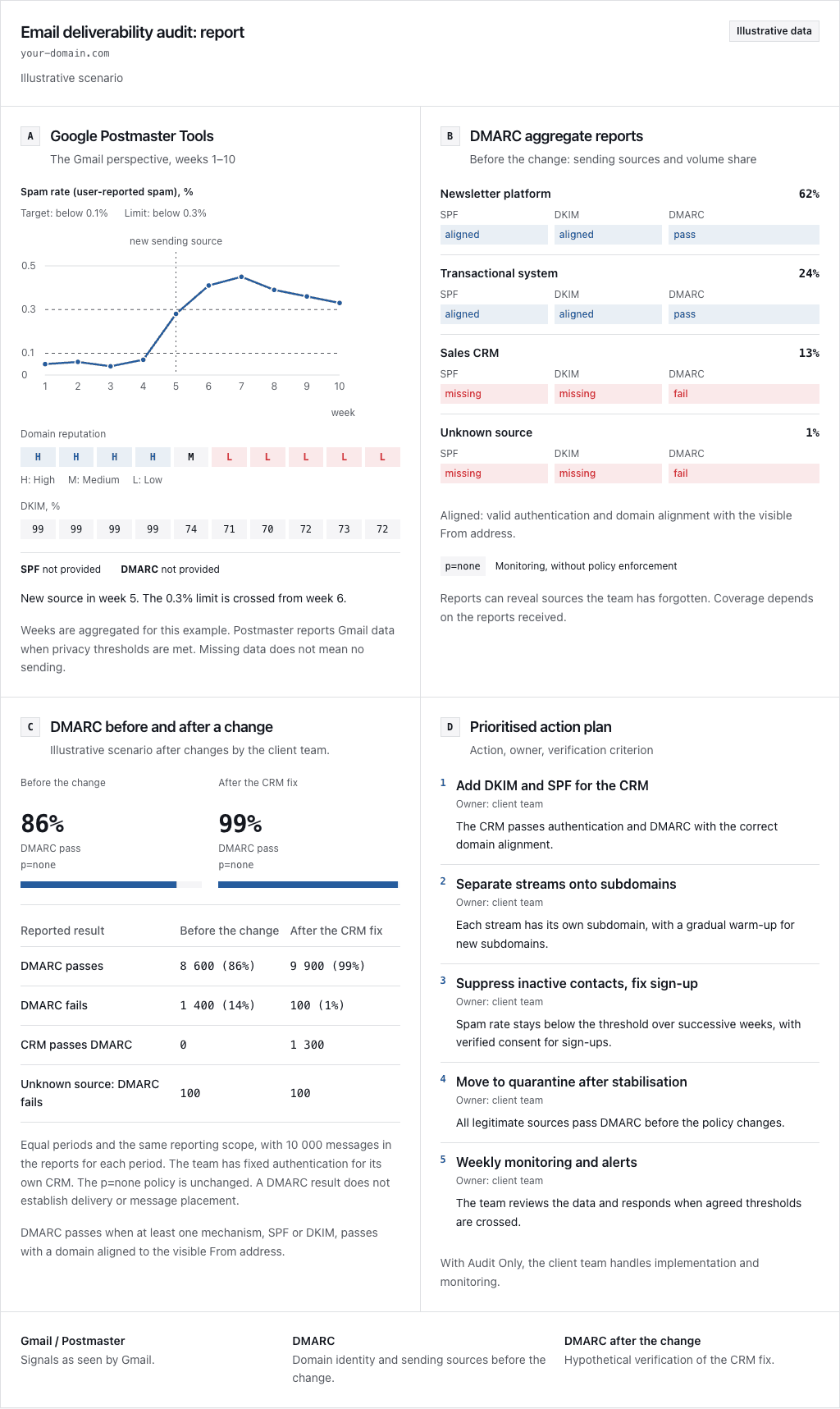
Gmail bulk sender mitigation is open only to a verified domain owner whose domain meets Google’s sender guidelines, so the order of work is the requirements first, then the Postmaster data, then the report. Verify three layers first: technical compliance on the wire, health signals in Postmaster Tools, and domain eligibility. Google’s sender requirements and Postmaster documentation were checked on 11 September 2026. This guide covers personal accounts ending in @gmail.com and @googlemail.com, which represent the personal-account scope that Postmaster monitors. Google Workspace senders must follow these rules when reaching consumers, but mail arriving at Workspace domains and mail moving inside one lie outside this policy (Workspace boundary).
Which requirements apply to your stream
Google counts sending volume across your primary domain and every subdomain combined. Once you come close to 5,000 messages within 24 hours, Google classifies you as a bulk sender permanently. Sending fewer emails later does not remove that classification. What matters is whether the domain has ever crossed the threshold, not today’s volume.
Use this audit table to inspect the affected sending pipeline. Pair each check with raw headers or server logs so colleagues can verify conclusions independently.
| Check | Who it applies to | Evidence to inspect |
|---|---|---|
| Authentication | All senders: SPF or DKIM. Bulk senders: both, plus DMARC; p=none is permitted. | Authentication results in original message headers and published DNS records, verified against requirements for all senders and requirements for bulk senders. |
| Alignment | Bulk direct mail | The From header aligned with the domain that passed SPF or DKIM; passing either satisfies the direct-mail alignment rule. |
| DKIM key | DKIM users | At least 1024 bits, with 2048 recommended where the platform supports it (DKIM key sizes). |
| Sending IP and TLS | All senders | A PTR hostname that resolves through A/AAAA back to the sending IP (DNS relationship), and TLS confirmed in transport logs (transport requirement). |
| Format and identity | All senders | RFC 5322 formatting and no impersonated Gmail From address (message requirements). |
| Unsubscribe | Bulk marketing or subscription mail | A visible unsubscribe link in the body alongside functional one-click headers (subscription requirements). Verify HTTPS List-Unsubscribe and List-Unsubscribe-Post: List-Unsubscribe=One-Click headers per Google guidance on how to make it easy to unsubscribe. |
Transactional messages are exempt from one-click unsubscribe. Where the requirement does apply, Google expects the request to be honored within 48 hours (unsubscribe enforcement). If this audit exposes a gap, continue with the Gmail compliance incident procedure.
What does Postmaster data cover, and when was it recorded?
Postmaster Tools requires a Google account (account prerequisite). Register the domain that authenticates your messages through SPF or DKIM (domain selection), then verify it before you expect any data (domain verification). The verified domain owner can grant dashboard access to colleagues. Identify who owns that primary Google account before an outage forces the question.
Log every Postmaster reading alongside the domain, the view, and the exact UTC date. Data usually appears within 24 hours but can be late, and Google may withhold data for low volumes (data coverage). The Compliance status tab evaluates your primary domain by rolling up all underlying subdomains (compliance scope). Because compliance relies on a rolling window, the dashboard can take seven days to reflect a repair. When readings stay blank or data freezes, review why Postmaster Tools data is missing, stale or not updating.
The Authentication dashboard provides separate views: checking the DKIM or SPF domain omits DMARC results, so select the From domain tab to review DMARC compliance (Authentication views). Meanwhile, Delivery Errors tracks the percentage of authenticated outbound volume that Gmail throttled with temporary deferrals or rejected outright (how delivery errors are measured).
The Postmaster spam rate reflects user spam reports submitted against DKIM-signed messages delivered to active inboxes. When a recipient moves an email from Spam back to the inbox, Google counts that message as inbox-delivered. This explains why a low reading can deceive: if Gmail already placed the stream in spam automatically, the rate can look low for the wrong reason (how spam rate is measured).
Google has postponed the retirement of the old Postmaster interface. While the dedicated Domain and IP Reputation dashboards remain absent from v2, Google continues assessing sender reputation as one of several deliverability factors. When you follow older instructions, don’t assume the legacy panel is still there.
For campaign-level tracking, Google provides an optional Feedback Loop (FBL) driven by the Feedback-ID header (campaign identifiers). Its documented scope is @gmail.com (FBL recipient scope). The aggregate data comes with conditions on signing, domain verification, traffic volume and report volume, and the data never discloses individual recipient addresses (FBL data conditions).
| What you have established | Next decision |
|---|---|
| A current requirement fails on the affected path | Repair it and inspect evidence from later messages on that path before you think about mitigation. |
| The domain, view or date is wrong, or data is missing | Resolve the mismatch; until then, treat the result as unknown. |
| Failures continue after verified repairs | Preserve the remaining evidence and assess the reporting prerequisites below. |
This order is a recommendation. An empty graph does not prove clean delivery, and sending extra traffic to make it fill up would not create the evidence you are missing.
Scenario: two streams, one incident
Consider an example setup: news.example.net dispatches 3,200 marketing newsletters while receipts.example.net sends 2,400 transactional purchase receipts to Gmail recipients inside a single 24-hour window. The operator repairs an authentication gap today, notes an older Postmaster compliance check with a spam rate of 0.04%, but continues seeing SMTP deferrals on outbound queues. All of these observations are invented; nothing was sent, and no tested deployment or client result stands behind them.
Together the two streams add up to 5,600 messages in 24 hours, which puts the root domain example.net in bulk scope under the counting rule above. Two questions remain open: are newly generated messages using the patched authentication path, and what specific SMTP rejection codes accompany the active deferrals? Neither the historical compliance stamp nor the 0.04% spam rate resolves these issues. Compare messages from around the repair time, preserve the full SMTP responses, and take the next diagnostic step with the bounce-reading reference.
When Gmail begins issuing deferrals or bounces, Google advises senders to throttle traffic volume until error rates drop, then increase sending volume slowly. If errors persist at minimal throughput, examine individual message structures for policy violations. For temporary failures, increase the retry delays with exponential backoff recommended. Document every adjustment so you can verify whether subsequent traffic demonstrates genuine recovery or reveals deeper configuration faults.
When can you request Gmail bulk sender mitigation?
Google recommends the reporting route inside Postmaster. The form is accessible only to a verified domain owner with a compliant domain, and bulk mitigation additionally requires compliance with all sender guidelines.
Maintain a daily spam complaint rate below 0.1% and prevent it from climbing toward 0.3%. The moment your complaint rate hits 0.3% or higher, bulk sender mitigation becomes completely unavailable. Restoring eligibility requires keeping spam complaints strictly below 0.3% for seven consecutive days while satisfying all other technical standards. Two points are easy to misread: the seven-day condition does not promise recovery within seven days, and reaching exactly 0.3% does not grant a borderline exemption (spam-rate conditions).
Before opening the submission form, assemble a structured incident file: recipient scope, authenticating domains, affected streams, timeframe, the relevant SMTP responses or an authorized message sample, the dashboard dates and the repairs made. These are investigation notes; they are not a claim about which form fields are mandatory.
Open Report delivery issue inside Postmaster Tools, choose your authenticating domain, and select Create new report. Your sample message must pass both SPF and DKIM authentication, and its From domain must match the selected domain. The Get message info for me utility accepts raw message text downloaded through Gmail’s Show original option. Complete each form section and submit your ticket. Submitting a delivery report requires both SPF and DKIM to pass on the sample, whereas daily DMARC compliance only demands alignment on one (report preparation and creation). After submission, use the Reported issues dashboard to track the status of your escalations.
Google assesses each request against its own criteria. When granted, mitigation temporarily disables the relevant enforcement signals and depends on improved sending practices; ticket submission does not guarantee approval, a permanent waiver, or inbox placement (not guaranteed). Furthermore, Google declines third-party allowlist requests submitted by email service providers on behalf of clients (provider allowlist limit).
Use the escalation evidence checklist to catalog findings and log every post-escalation observation alongside the ticket reference.
Frequently asked questions
When does Google treat a domain as a bulk sender?
Permanently, once you come close to 5,000 messages within 24 hours. Google counts messages across your primary domain together with all of its subdomains, and a quieter day afterwards does not reset that status.
Which spam rate makes Gmail bulk sender mitigation unavailable?
Any rate at or above 0.3%. Regaining spam-rate eligibility takes seven consecutive days below 0.3%, with the other conditions still applying, and exactly 0.3% is not an eligibility loophole.
Who can report a delivery issue in Postmaster Tools?
Only a verified domain owner with a compliant domain, and bulk mitigation additionally requires compliance with all sender guidelines.
Why can a low Postmaster spam rate be misleading?
Because the spam rate counts user reports on DKIM-authenticated mail that reached the inboxes of engaged recipients. If Gmail already placed the stream in spam automatically, the rate can look low for the wrong reason.
Does granted mitigation mean the mail will reach the inbox?
No. Granted mitigation temporarily disables the relevant enforcement signals and depends on improved sending practices. Approval, a permanent bypass and inbox placement are not guaranteed.